Offline voice cloning for creators
Clone any voice — and narrate everything with it
Clone a voice from a 10-second sample — yours, a client's, a voice actor's — paste any script, and render studio-quality voiceovers on your own computer. No cloud, no per-word fees, no subscription.
One-time purchase · Windows & macOS · 60-day AppSumo refund policy
- Runs 100% on your device
- Voice samples never leave your computer
- Unlimited renders
- Local automation API
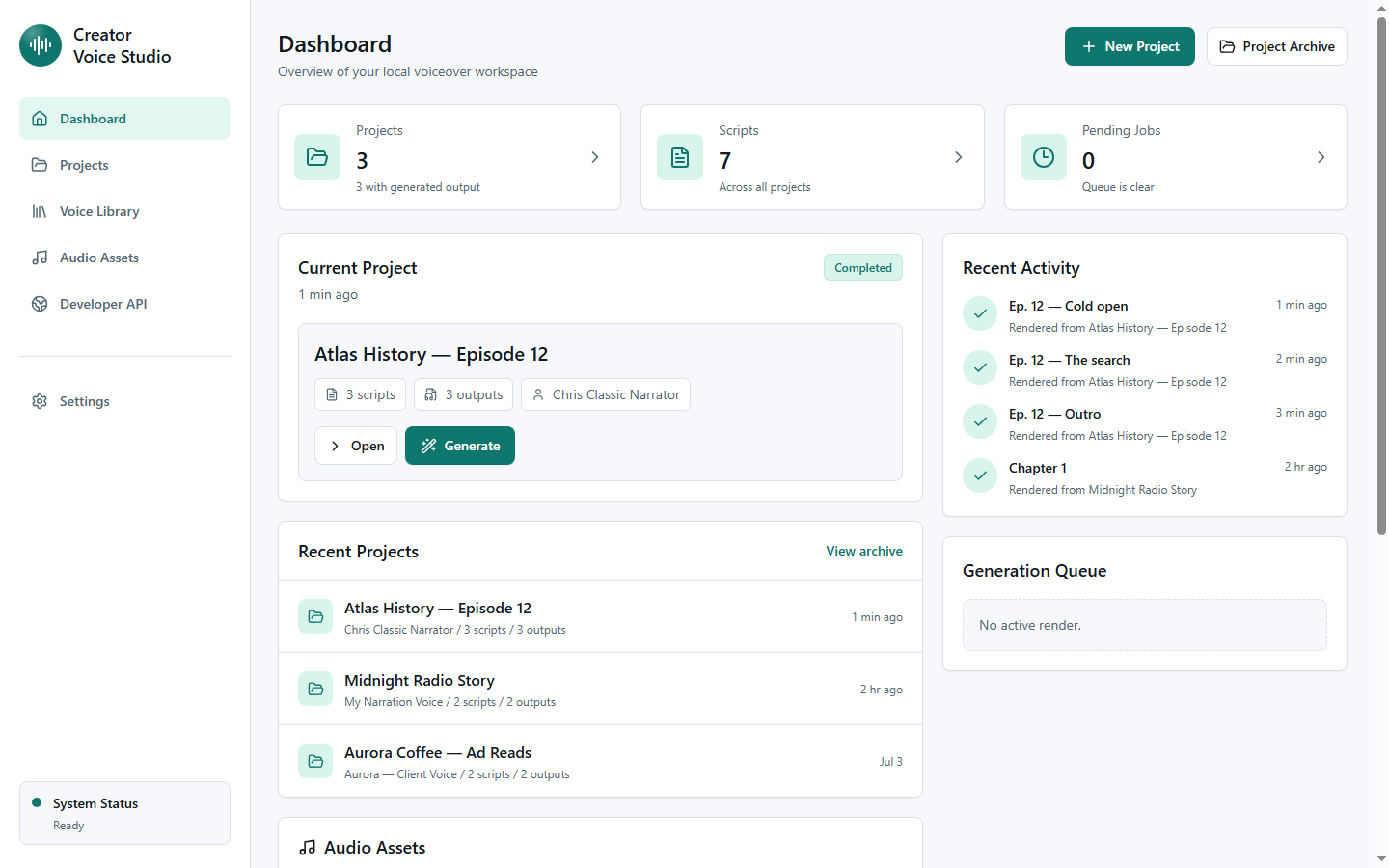
- starter voices included
- 21
- languages out of the box
- 8
- delivery presets
- 18
- renders, no metering
- ∞
The starter voices
21 voices in 8 languages, ready on first launch
Every voice profile that ships in the app — press play to hear them. Then clone any voice you have rights to from a 10-second sample.
English 7 voices
Betsie Warm Narrator
North American · Female
Chris Classic Narrator
British · Male
Tim Adventure Narrator
British · Male
Aria Studio Narrator
American · Female
Guy Broadcast Voice
American · Male
Sonia British Storyteller
British · Female
Neerja Expressive Guide
Indian · Female
Spanish 3 voices
Karen Spanish Storyteller
Spanish · Female
Dalia Spanish Narrator
Mexican · Female
Jorge Spanish Narrator
Mexican · Male
French 2 voices
Didier French Narrator
French · Male
Ezwa French Storyteller
French · Female
German 1 voice
Hokuspokus German Narrator
German · Female
Arabic 2 voices
Shakir Arabic Narrator
Egyptian · Male
Zariyah Arabic Guide
Saudi · Female
Hindi 2 voices
Madhur Hindi Narrator
Indian · Male
Swara Hindi Storyteller
Indian · Female
Sinhala 2 voices
Sameera Sinhala Narrator
Sri Lankan · Male
Thilini Sinhala Storyteller
Sri Lankan · Female
Tamil 2 voices
Kumar Tamil Narrator
Sri Lankan · Male
Saranya Tamil Storyteller
Sri Lankan · Female
Starter voices are public-domain LibriVox narrations and MIT-licensed studio samples included with the app. Clones you make live only on your computer, and every render carries an inaudible watermark.
Inside the studio
A real production tool, not a text box
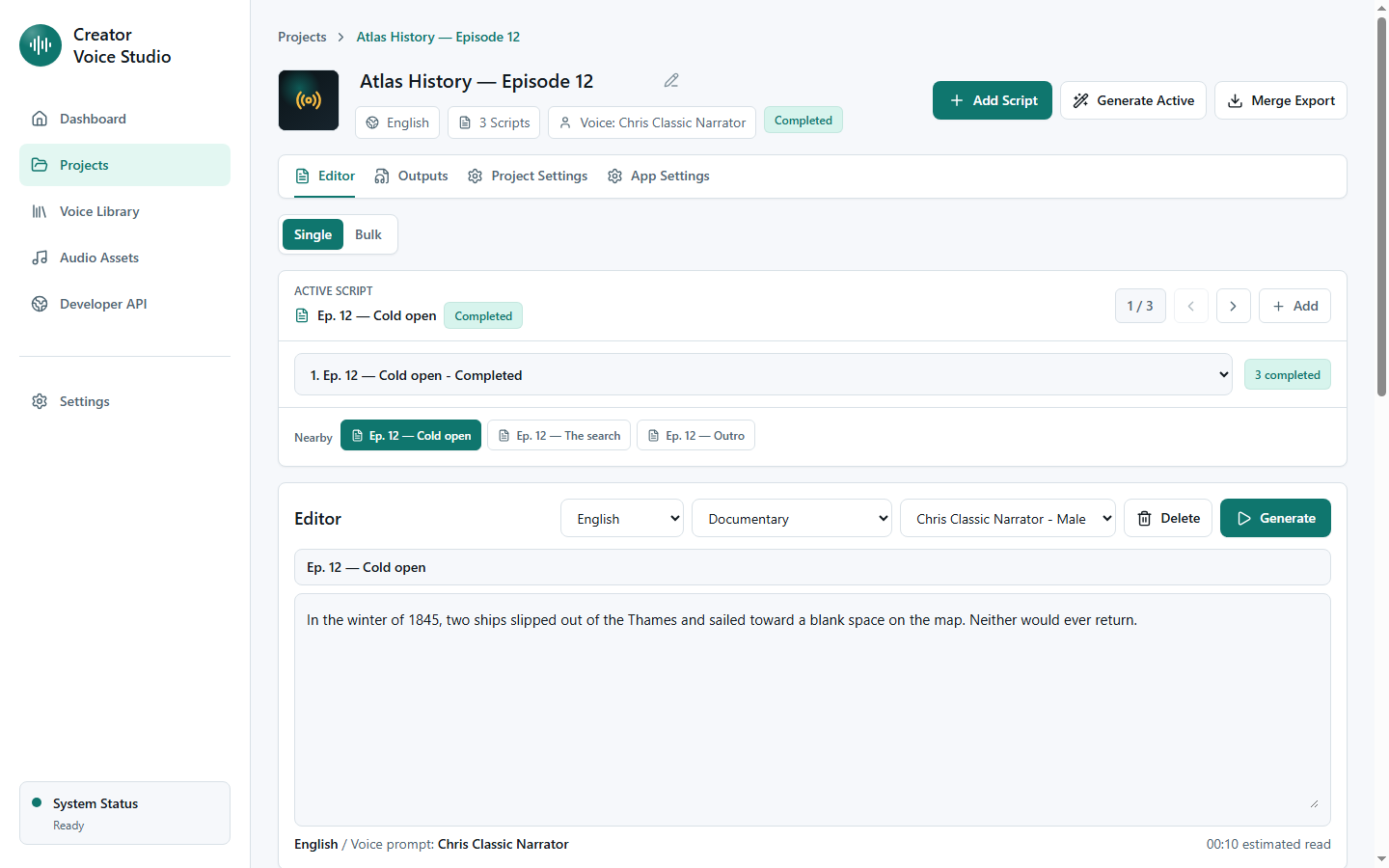
Projects, scripts, and batch renders
Organize scripts into projects, queue whole episodes, and tune delivery — expressiveness, pacing, pauses — per script. Merge takes into one file when you're done.
Your voice library
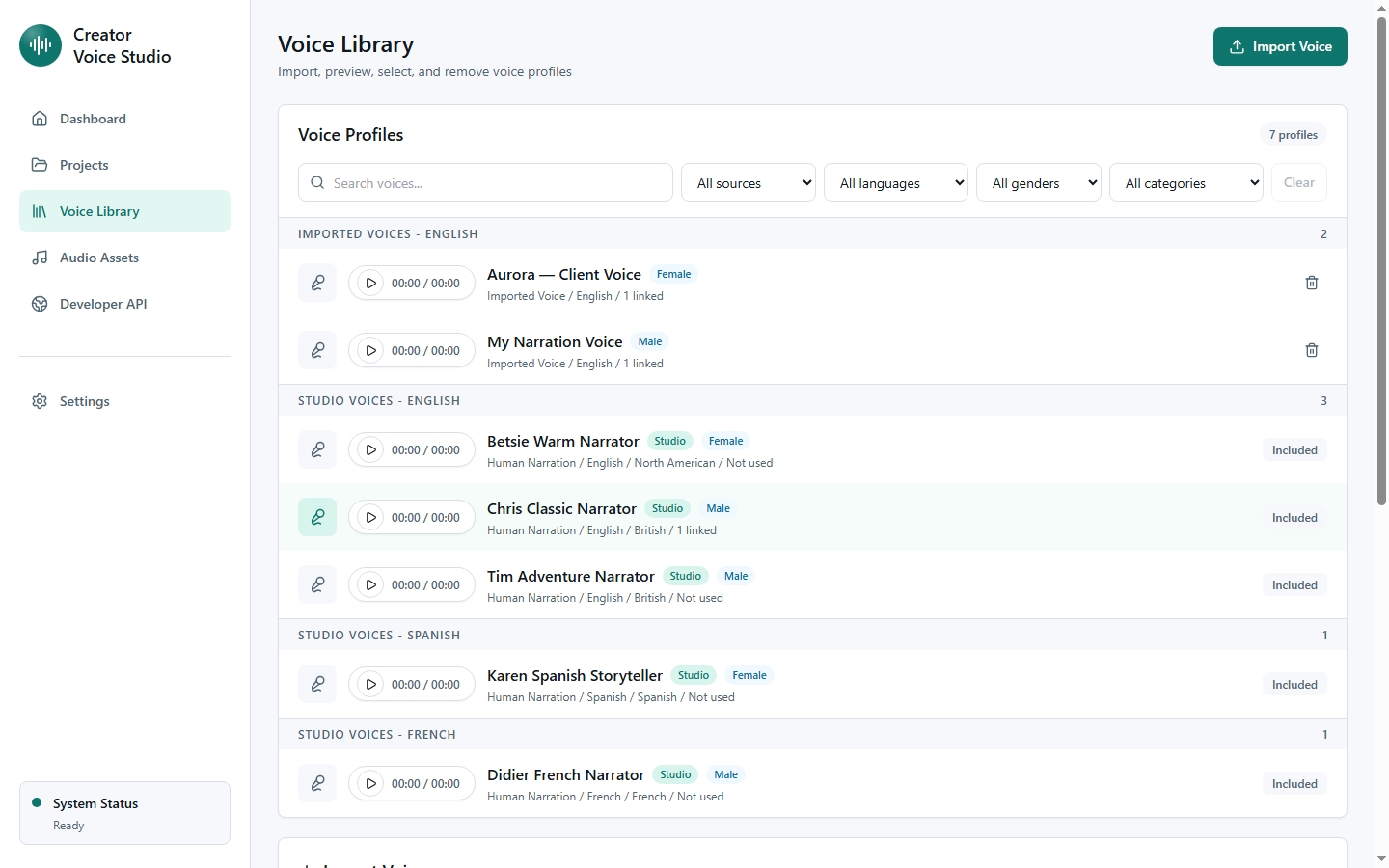
Keep every voice you're allowed to use — your narration voice, characters, client-approved reads — and switch per script. Import from a file or record a sample right in the app.
Who it's for
Built for people who publish with their voice
YouTubers & faceless channels
Ship daily videos without daily recording sessions. Fix a flubbed line by editing text, not re-recording — your channel keeps one consistent voice.
Podcasters
Patch intros, ads, and corrections in the show's voice after the mic is packed away. Keep episodes consistent across months.
Course creators & educators
Update a lesson when the material changes instead of re-recording the module. Your course narration stays uniform from lesson 1 to 100.
Authors & storytellers
Turn manuscripts and serials into narrated audio, chapter by chapter, with a storytelling delivery preset.
Marketers & agencies
Batch-produce ad reads, explainers, and localized variants with client-approved voices — without booking studio time for every revision.
Developers & tinkerers
Pipe narration into your own apps, games, and pipelines through the local API — no cloud quota, no latency to a server farm.
Ways to earn with it
One purchase, many income streams
Voiceover is usually the bottleneck between "written" and "published". Remove it, and volume becomes your advantage.
Monetized YouTube channels
Narrate scripts at scale for niche channels — history, finance, sports recaps, top-10s — and earn through ads and sponsors. Rendering locally means volume costs you nothing extra.
Freelance voiceover delivery
Offer fast-turnaround narration on Fiverr or Upwork using your voice or a client-approved clone, delivered in hours instead of days. Revisions are a text edit, so rush jobs stay profitable.
Audiobooks & narrated fiction
Narrate your own books and serials for platforms that accept author-narrated or synthetic audio, or publish audio chapters to Patreon and your own site.
Online courses
Record entire curriculums without studio costs, and keep them current — refreshed lessons sell longer and refund less.
Content agency services
Add voiceover to your agency's menu: explainer videos, ad variants, localized reads — produced in batches with client-approved voices.
Voice features in your products
Use the local API to add narration to the apps, games, and tools you sell — generated on your machine during production, shipped as normal audio files.
Earnings depend on your content and effort — no income guarantees. Check each platform's current policy on synthetic voice, and only monetize voices you own or have written permission to use.
How it works
From voice sample to finished voiceover in three steps
-
1
Import a short sample
Record or drop in 10–30 seconds of clean audio of any voice you have permission to use — yours, a client's, a voice actor's — plus its transcript.
-
2
Paste your script
Write or paste any text — single takes or bulk batches. Organize scripts into projects with per-project render settings.
-
3
Generate locally
The voice engine renders on your CPU or GPU. Preview, tweak pacing and expressiveness, then export WAV files ready for your edit.
Built for narration work
Everything a voiceover workflow needs, nothing it doesn't
Private by architecture
Voice samples, scripts, and renders stay in a local workspace on your machine. Nothing is uploaded — there is no server to upload to.
A library of your voices
Keep multiple voice profiles — your narration voice, character voices, client-approved voices — and switch per script.
Projects & bulk rendering
Group scripts into projects, batch-generate entire episodes, merge takes, and manage your audio assets in one place.
Fine control over delivery
Adjust expressiveness and pacing per render, with delivery presets for narration, storytelling, and ads.
Local automation API
A documented REST API on your machine: list voices, queue renders, fetch audio — from Python, Node, or anything that speaks HTTP.
Responsible by default
Every render carries an inaudible watermark, and the license requires consent for any voice you clone.
For developers
Automate it from your own tools
The app exposes a local REST API on your computer. Batch-render an entire video series from a script folder, wire narration into your publishing pipeline, or add voiceover to your own apps and games — with the same unlimited, offline engine.
Read the API docs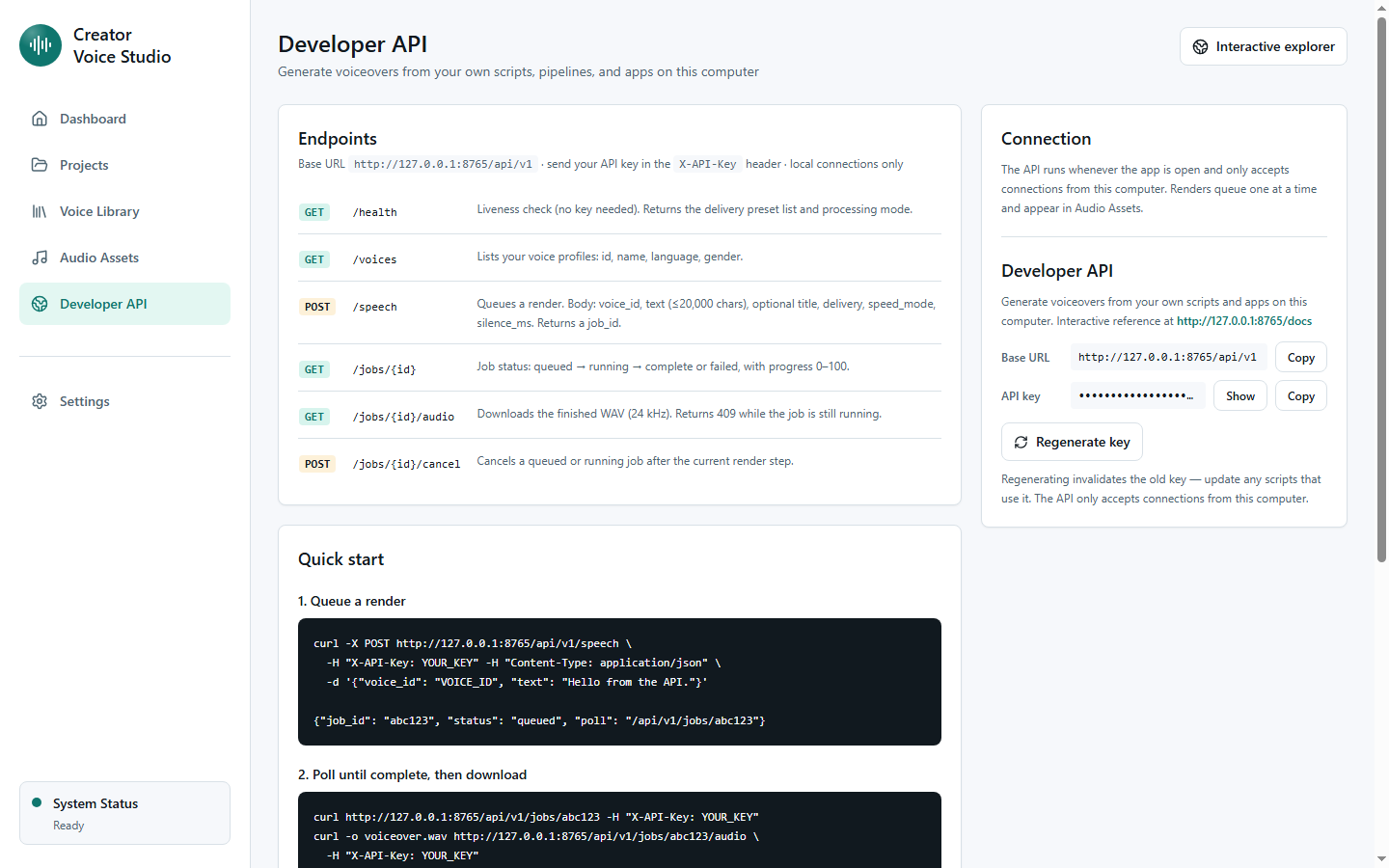
Why offline
Own the studio instead of renting the microphone
| Aspect | Cloud TTS subscriptions | Creator Voice Studio |
|---|---|---|
| Pricing | Monthly fee + per-character limits | One-time purchase, unlimited renders |
| Your voice data | Uploaded and processed on their servers | Never leaves your computer |
| Works without internet | No | Yes — generate anywhere |
| API automation | Metered per request | Local API, unmetered |
| If the service shuts down | You lose access | The app keeps working |
Questions
Frequently asked
What do I need to run it?
A reasonably modern Windows 10/11 PC or Mac (Intel or Apple Silicon), around 8 GB of free disk space for the voice engine, and 8 GB+ of RAM. A GPU speeds things up but is not required.
How many computers can I use one license on?
Each license activates on up to 1 computers at the same time. You can deactivate a computer from inside the app to free a seat.
Can I clone any voice?
Only voices you own or have explicit permission to use — that is part of the license agreement. Every render also carries an inaudible watermark.
Can other apps use it?
Yes. The app runs a documented REST API on your computer (secured with an API key from Settings). Anything that can make an HTTP request — Python scripts, Node tools, automation platforms running locally — can list voices, queue renders, and download the audio.
Does it really work offline?
Yes. After a one-time engine download during setup, generation runs entirely on your machine. The app only goes online occasionally to confirm your license.
Can I sell what I make with it?
Yes — the audio you render from voices you have rights to is yours to publish and monetize. Platforms set their own rules on synthetic voice, so check the current policy of wherever you publish.
What is the refund policy?
Purchases through AppSumo include their standard 60-day money-back guarantee, handled directly by AppSumo.
Any voice, on demand — forever
Buy once on AppSumo, activate on your computer, and never re-record a pickup line again.
60-day refund policy · Instant license delivery · Windows & macOS